
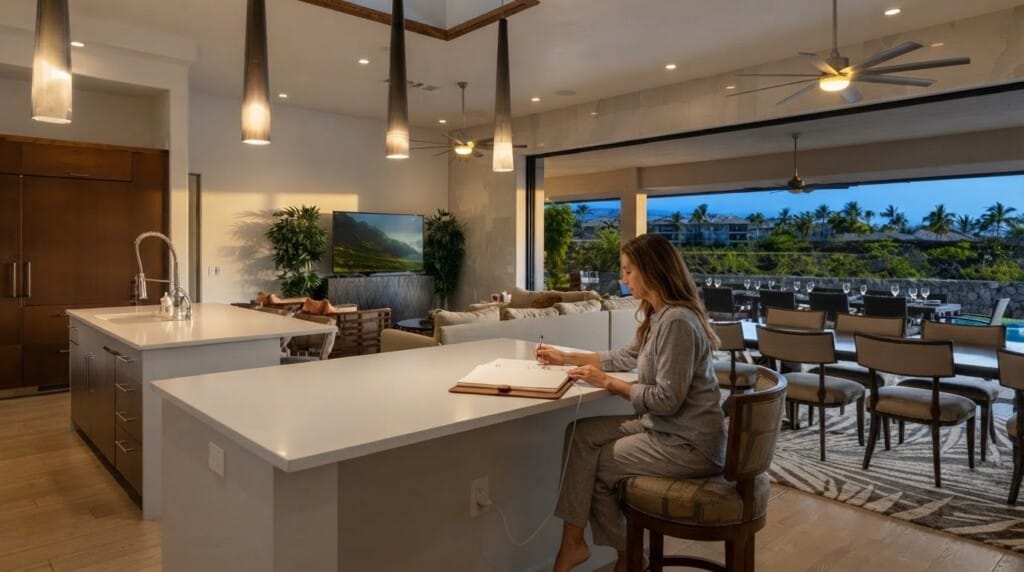

A workation combines travel with remote work. Planning a workation in Hawaii means choosing a setting where work and time away can fit into a thoughtful rhythm.
Hawaii’s beauty makes it an inviting place to work remotely, but daily details matter too. A comfortable seat, accessible outlets, and dependable internet can help you shape a smoother workday, with cafés nearby for a change of scenery.
This guide explores why Hawaii can suit remote work and how to choose a workspace for your routine. You’ll learn what to consider about seating, power, coffee shops, and useful amenities, so you can plan focused workdays with room to enjoy the island.
Key Takeaways
- Match your work hours to Hawaii’s time difference so mainland meetings fit comfortably into your day.
- Choose a workspace with dependable internet, practical outlet access, and seating that supports focused work.
- Plan a nearby backup for calls, and consider how public Wi-Fi fits your work needs.
- Map coffee shops and everyday amenities around your stay to make work breaks easier.
- Compare the islands by the kind of workday and downtime you want, then choose a base that supports both.
1. Why Should You Choose Hawai’i for Remote Work?
Hawai’i pairs a memorable island setting with the possibility of a focused workday. Planning a workation in Hawaii starts with practical choices: a suitable workspace, dependable internet, and a backup connection for important calls. With those pieces in place, you can shape work hours around time outdoors and the experiences that brought you to the islands.
Visitors from other U.S. states travel domestically. For international visitors, the ability to work remotely during a stay depends on immigration status and individual circumstances. Before planning a workation in Hawaii, understand how your status and your employer’s policies apply to the trip.
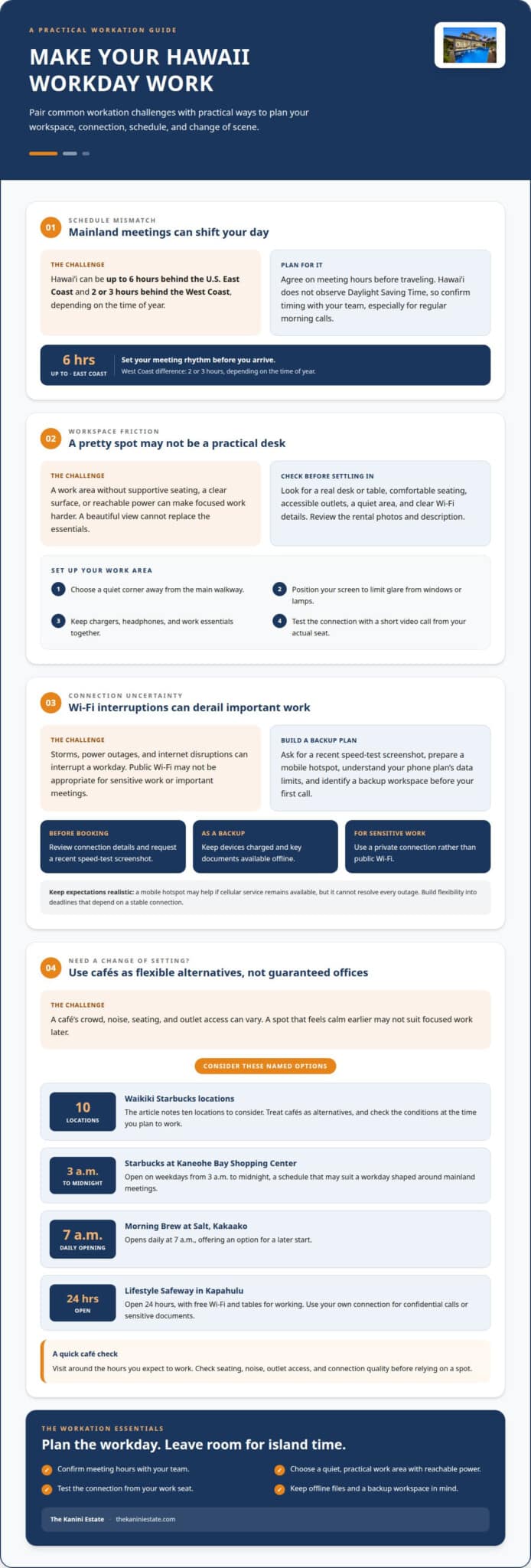
Time differences affect meetings with mainland teams. Hawai’i can be up to six hours behind the U.S. East Coast and two or three hours behind the West Coast, depending on the time of year. Hawai’i does not observe Daylight Saving Time. Agree on meeting hours before traveling, especially if regular morning calls are part of your role.
Budget for the workspace and transport you expect to use. Account for coworking spaces, mobile hotspot data, parking, and local travel between your lodging and daily destinations. Parking costs vary by location and facility, so include your likely parking option in your trip estimate. Mapping your route also helps determine whether you need a rental car or other transport.
For internet connectivity, review the lodging’s connection details and request a recent speed-test screenshot before booking. Prepare a mobile hotspot as a backup, and understand your phone plan’s data limits. Public Wi-Fi may suit light tasks, but use a private connection for sensitive work or important meetings. Saving essential files for offline access is another practical safeguard.
Storms, power outages, and internet disruptions can interrupt a workday. Keep devices charged, store key documents offline, and identify a backup workspace before your first call. A mobile hotspot may help if cellular service remains available, but it cannot resolve every outage. Build flexibility into deadlines that depend on a stable connection.
Respect local communities and the natural environment. Follow posted signs, stay on marked paths, keep your distance from wildlife, and leave beaches and cultural sites as you found them. These habits help protect the places you visit. With thoughtful planning, you can stay productive while making your island time feel considered and unhurried.
2. Electrical outlets and workspace seating
A productive workspace starts with a stable surface, supportive seating, and power within reach. When searching for lodging, look for a desk or table with room for your laptop, notebook, and water glass. A dining chair may suit a short session, but longer work blocks call for a seat that lets you sit comfortably and stay focused.
Review the work area in the rental description or photos. Look for a chair, a clear tabletop, nearby outlets, and a lamp or natural light. Check the Wi-Fi details and, if available, a speed-test screenshot to assess whether the connection suits video calls and shared files.
Outlet placement matters once you arrange your equipment. Check whether your charger reaches the desk without crossing a walkway. A power strip can bring connections closer, while keeping cords tidy and clear of foot traffic. If the work surface is far from an outlet, move it or choose another spot before unpacking.
Set up the designated work area before your first meeting. Use this sequence:
- Choose a quiet corner away from the main walkway.
- Position your screen to limit glare from windows or lamps.
- Keep chargers, headphones, and work essentials together.
- Test the connection and make a short video call from your actual seat.
The best long-term rentals with a dedicated workspace make daily work practical, not merely photogenic. Prioritize a quiet area, a real desk or table, comfortable seating, accessible outlets, and clear Wi-Fi details. A beautiful view can enrich the setting, but it shouldn’t replace these essentials.
Consider how the workspace fits your routine. If you take calls from the East Coast early in the day, set out your laptop and meeting notes the evening before. If you alternate between focused tasks and shared activities, choose a space where you can work without disrupting others. The right layout supports concentration and an easy daily rhythm.
Before settling in, take a few minutes to adjust the chair, screen, and lighting. Keep a notebook and water within reach, and place charging cables where they won’t snag. These simple steps can turn a spare table into an orderly workspace, ready for your first morning of remote work.
The best options have a quiet, practical work area with a real desk or table, comfortable seating, accessible outlets, and clear Wi-Fi details. Look for a layout that supports focused work and fits your daily routine without disrupting others.
3. Access to coffee shops and other amenities
A nearby café can add flexibility to your workday, especially when you need a change of setting or a quiet coffee between meetings. In Waikiki, ten Starbucks locations offer several places to consider. Treat cafés as alternatives, not guaranteed private offices. Busy periods, seating, and noise can affect whether a particular spot suits focused work.
For an early start, the Starbucks at Kaneohe Bay Shopping Center is open from 3 a.m. to midnight on weekdays. That schedule may suit a workday shaped around mainland meetings. Morning Brew at Salt in Kakaako opens daily at 7 a.m., offering another named option for a later start. Plan around the hours that fit your calendar.
Kapahulu offers a different kind of stop. The Lifestyle Safeway is open 24 hours and has free Wi-Fi and tables for working. This can combine a grocery run with a short work session. For confidential calls or sensitive documents, use your own connection rather than public Wi-Fi.
Before relying on a coffee shop, visit during the hours you expect to work. Notice the seating, noise, outlet access, and connection quality. A café that feels calm in the morning may be crowded later. Keep your lodging workspace as your dependable base, and use nearby places for lighter tasks and breaks.
Factor amenities into your location choice. Map coffee, groceries, and transport around your stay, then consider how each stop fits between work blocks. If you hope to visit beaches after meetings, choose a daily rhythm that leaves time to travel and return without rushing. This keeps the workday practical while preserving space for island life.
A short plan helps prevent last-minute searching. Save one café for an early coffee, another for a midday change of setting, and a grocery option for essentials. Note each place’s hours and distance from your lodging. For scheduled calls, choose a quiet, private workspace rather than relying on a public table. Keep coffee shops for flexible work, reading, or a pause between meetings.
With 10 Starbucks locations in Waikiki, you can compare options by how naturally they fit into your usual route rather than choosing by name alone. Think about whether a stop is convenient before work, between commitments, or on the way back to your lodging. A nearby café is most useful when it reduces friction in the day, not when reaching it creates another task. Keep your plans flexible, since a preferred table or atmosphere may not be available when you arrive.
Separate tasks by what they require. Leave calls, confidential work, and tasks that need steady concentration for your lodging or another private workspace. Use a café for reading, planning, or less sensitive work when the setting feels suitable. If conditions aren’t right, move on rather than forcing a work session; a short break may be a better use of the stop. Keep the day’s essentials close and leave room to adjust your route as meetings or energy levels change. This makes local amenities a practical supplement to your work setup while keeping your schedule adaptable and expectations realistic.
4. Benefits of working remotely in Hawaiʻi
Remote work in Hawaiʻi lets you bring your regular responsibilities into a setting shaped by ocean air, vivid landscapes, and a gentler pace. A focused laptop session followed by time outside can give the day a welcome change of rhythm. For anyone planning a workation in Hawaii, that balance is a central benefit, not simply a beautiful backdrop.
The island setting can make breaks feel more restorative. After a morning of focused work, step outside for fresh air or take a quiet pause near the water. These small rituals create space between tasks and help prevent work from blurring into every part of the trip.
Remote work can also make shared travel easier. Friends or family can enjoy breakfast together, spend work hours on separate tasks, then reunite for dinner. A corporate group can use the change of setting for thoughtful discussion and collaborative planning, away from familiar office routines.
Hawaiʻi’s natural surroundings invite a more deliberate daily rhythm. Begin with a demanding task, set aside time for lunch, then finish with an outdoor activity. For example, complete a report before taking a beach walk. Planning a workation in Hawaii around clear work blocks can protect both concentration and leisure.
Flexibility lets you choose the right setting for each task. Use a quiet indoor space for writing or important calls, then change your surroundings for lighter work or reading. After signing off, close the laptop and enjoy a swim, a shared meal, or the sunset. A clear transition helps keep work from taking over the evening.
A restorative trip needs room for genuine rest. Include at least one full day without work and let it unfold at a slower pace. Spend it with friends or family, explore a beach, or enjoy an unhurried morning. A protected day away from the screen can make the workation feel like a real escape.
These benefits come from balance, not from filling every hour. Protect time for essential tasks, keep plans flexible, and leave breathing room around work commitments. With a considered routine, remote work and island experiences can sit comfortably together, creating space for productivity and memorable time away.
5. What are the best Hawaiian islands for a workation?
For many remote workers, Oʻahu is the most practical base in Hawaiʻi. It offers an appealing starting point when reliable work routines and access to everyday amenities matter. Choose a specific area by considering your lodging workspace, transportation needs, and distance from places you plan to visit. A well-matched base can make the workday feel more settled.
Maui may suit travelers who want to pair work with island landscapes and planned excursions. Haleakalā National Park reaches 10,023 feet, and visitors planning to see sunrise must reserve in advance. Place a visit around your work calendar, rather than assuming an early outing will fit before meetings. A full day without work also leaves room to explore at an unhurried pace.
The Big Island can be a compelling choice for travelers drawn to a broader sense of retreat. Decide what matters most during your stay: a quiet work setting, time outdoors, or shared days with companions. Then choose a base that supports those priorities and your daily schedule. Avoid planning work around long outings unless your calendar allows for them.
Kauaʻi may also appeal if its landscapes and pace suit your travel style. As with any island, make your lodging and work setup the first filter. Consider whether your planned activities leave enough time for focused work, calls, and rest. The best choice is not simply the most scenic one, but the island that fits your actual routine.
Use a simple decision process before booking. First, map your work hours and meeting times. Next, identify the workspace and amenities you’ll use regularly. Then compare potential locations by travel time to those places and your preferred outdoor activities. This keeps your choice grounded in daily life, not just the view.
If you’re deciding between Oʻahu, Maui, the Big Island, and Kauaʻi, rank your priorities before choosing. Oʻahu is a practical base for many remote workers, while the other islands may better match a particular travel rhythm or setting. Let your work needs, desired downtime, and plans for exploring guide the final decision.
Factor this into your lodging plans before committing to a workation.
The Kanini Estate: Luxury vacation rental on the big island of Hawaii
For travelers nationwide who are planning a workation in Hawaii, The Kanini Estate provides a luxury vacation rental on the Big Island suited to those who want work and island time to share one setting. It offers a considered base for friends and family seeking time together, or for a corporate retreat that needs space for focused thinking. The right fit depends on the kind of stay you’re planning.
For a workation with friends or family, a shared retreat can bring work and connection into the same trip. Set aside quiet hours for focused tasks, then make time to gather and enjoy the island together. A thoughtful rhythm lets each person meet their responsibilities without losing the feeling of a shared escape.
For corporate groups, a distraction-free thinking environment can support planning, discussion, and sustained concentration. A change of setting may help teams step back from familiar routines and give important conversations room to unfold. Plan work sessions around clear goals, then leave time for reflection and informal conversation.
The Big Island also suits travelers from across the country who want their stay to feel like an escape to paradise, rather than a sequence of work appointments. Define work hours before arrival and protect time beyond them. That boundary helps make the retreat restorative while keeping professional commitments in view.
Before choosing a stay, consider how the group intends to spend its days. A family workation may need a balance of individual focus and shared time. A corporate retreat may call for a calm setting where participants can think without everyday distractions. In either case, agree on the trip’s purpose and the pace that will make it meaningful.
The Kanini Estate brings these possibilities together on the Big Island: a luxury vacation rental, time with friends and family, an escape to paradise, and a high-quality, distraction-free thinking environment for corporate retreats. It’s a natural option when your plans call for a private retreat with room for focused work and time together.
If this sounds like the right setting for your stay, please contact The Kanini Estate.
Frequently Asked Questions
Why Should You Choose Hawai’i for Remote Work?
Hawai’i can give a remote workweek a distinct sense of place, with time outside and island experiences close to your stay. The key is to build a routine that protects work hours and leaves room for exploring. For example, schedule demanding tasks during your strongest focus period, then reserve open time for a walk or shared meal. That balance helps the trip feel restorative rather than like ordinary work in a different setting.
What is the average cost of a month-long workation in Hawaii, including lodging, food, and transportation?
There isn’t one useful average for every month-long workation because lodging, food, and transportation depend on the island, travel dates, and daily plans. Build a personal estimate by listing your stay, meals, local transport, work needs, and planned activities separately. Then add airfare and any inter-island travel. Compare the total with your trip priorities, and adjust your stay or itinerary before booking.
Which areas in Hawaii offer reliable high-speed internet and coworking spaces?
Oʻahu is described as a practical base for many remote workers, but internet quality depends on the specific lodging and workspace. Don’t assume an area name guarantees a dependable connection. Look for a rental that shares internet details, and assess whether its workspace suits your calls and tasks. If coworking matters, include proximity to a suitable shared workspace in your location criteria, alongside transport and daily amenities.
How should I budget for flights, inter-island travel, and local transportation in Hawaii?
Start with your airfare to Hawaii, then add inter-island flights only for islands you plan to visit. For each destination, account for ground transport between the airport, lodging, and planned activities. A single-island stay can simplify logistics, while island-hopping adds travel legs and coordination. Compare your routes with your work calendar, and leave enough time between travel and meetings to avoid a rushed arrival.
What are the best long-term rentals in Hawaii with a dedicated workspace?
Look for a rental with a quiet work area, a real desk or table, comfortable seating, accessible outlets, and clear Wi-Fi details. Request a recent internet speed-test screenshot before booking.