
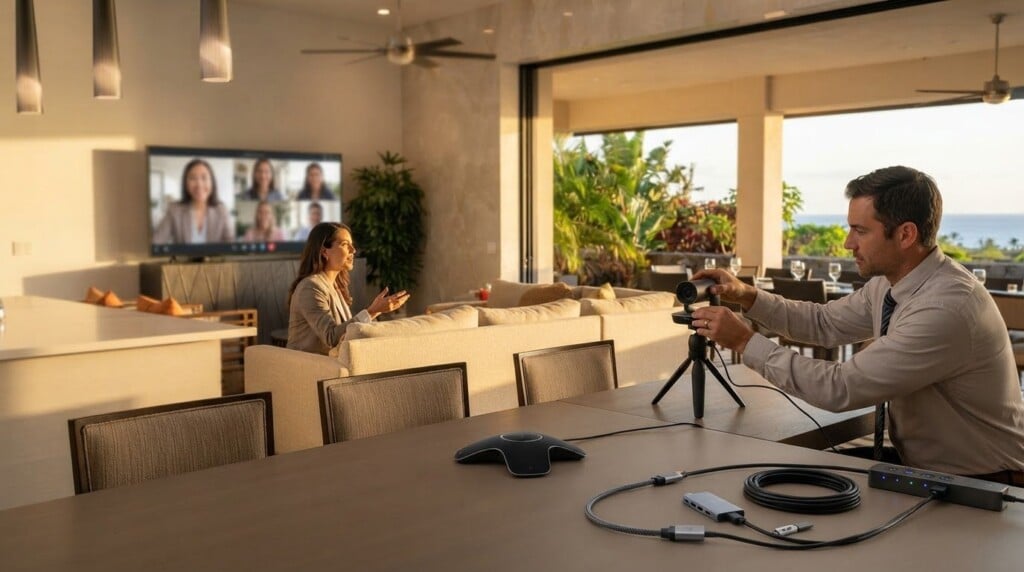

A beautiful retreat setting can’t make up for a meeting room where voices blur or a shared screen refuses to connect. Planning the technology needs for a corporate work retreat means matching audiovisual support to the agenda, confirming venue facilities, preparing backup supplies, and making space for remote participants. Confirm technical requirements 2-4 weeks before the retreat.
It’s easy to focus on screens and speakers, yet the quieter challenge is helping everyone feel part of the same conversation, whether they’re seated around the table or joining from afar. A thoughtful plan keeps the practical details in hand without letting technology take over the gathering. Here, you’ll learn how to assess AV needs, make use of venue facilities, prepare for technical hiccups, support hybrid meetings, and share clear instructions with attendees. With the essentials settled, your group can turn its attention to the work, the exchange of ideas, and the restorative setting around it.
Key Takeaways
- Match screens, sound, and technical support to the retreat agenda, then confirm the setup well before arrival.
- Prepare simple backup supplies and a clear response plan so a device or connection issue doesn’t derail a session.
- Design hybrid meetings so remote participants can hear, see, and contribute without being treated as an afterthought.
- Share practical connection details and meeting expectations in advance to reduce confusion and keep conversations flowing.
- Assess venue facilities by how well they support focused work, reliable presentations, and the retreat’s planned activities.
1. Audiovisual equipment and technical support
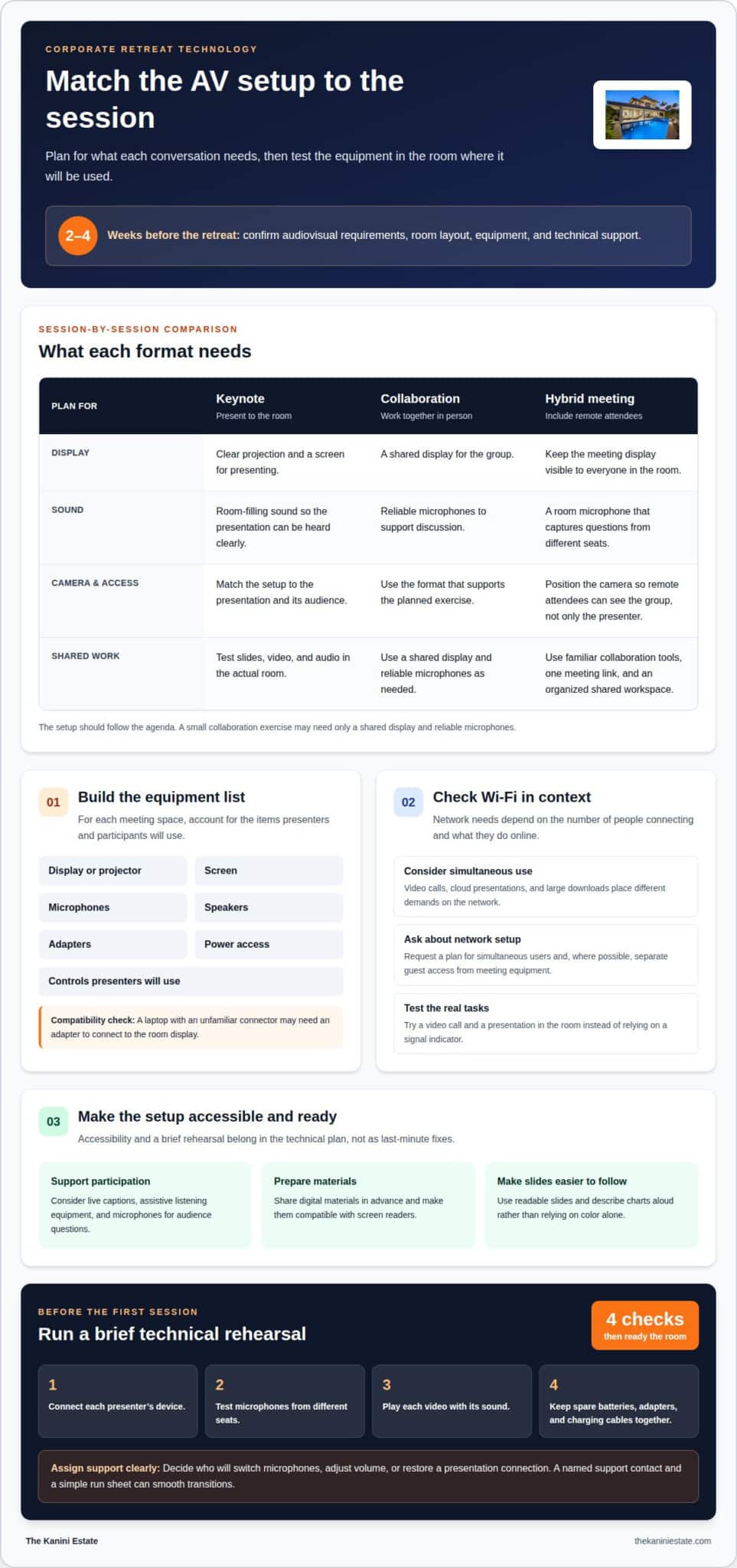
Technology needs for a corporate work retreat begin with the agenda. Match each session to its audiovisual setup. A keynote needs clear projection and room-filling sound; a small collaboration exercise may need only a shared display and reliable microphones. Confirm technology and audiovisual requirements 2-4 weeks before the retreat so equipment, room layout, and technical support align before participants arrive.
Create an equipment list for each meeting space. Include the display or projector, screen, microphones, speakers, adapters, power access, and any controls presenters will use. For example, a laptop with an unfamiliar connector may need an adapter to connect to the room display. Test slides, video, and audio in the actual room, not just at a desk.
AV support can help set up equipment, test connections, and resolve issues during a session. Decide who will handle tasks such as switching microphones, adjusting volume, or restoring a presentation connection. A named support contact and a simple run sheet can smooth transitions between speakers and activity formats.
In the US, AV rental costs depend on the equipment, rental period, delivery, setup, and technician support.
Wi-Fi needs depend on how many people connect and what they do online. Video calls, cloud presentations, and large downloads place different demands on a network. Ask for a network plan that accounts for simultaneous users and, where possible, separates guest access from meeting equipment. Test the connection in the room during a video call and presentation rather than relying on a signal indicator.
Accessibility technology should help every attendee follow and contribute. Consider live captions for presentations, assistive listening equipment, microphones for audience questions, and digital materials compatible with screen readers. Use readable slides and share them in advance. For example, presenters can describe a chart aloud rather than relying on color alone.
Assess technology needs for a corporate work retreat against the actual session plan, including accessibility and data handling. Before the first session, run a brief technical rehearsal: connect each presenter’s device, test microphones from different seats, and play any video with its sound. Keep spare batteries, adapters, and charging cables together. The U.S. Department of Labor checklist also calls for policies on data security and handling private and confidential data.
3. Backup supplies and contingency planning
A useful contingency plan covers more than equipment. It gives organizers a clear response when travel, attendance, or the schedule changes. If a delayed arrival affects the opening discussion, for example, move that session later and begin with an activity suited to those already present. Record the alternate sequence in the run sheet so facilitators can adjust without rebuilding the retreat plan.
Map likely disruptions to decisions before departure. Consider what happens if a speaker is unavailable, an activity cannot proceed, or a room is temporarily out of use. For each scenario, identify who can approve a change, which sessions can move, and what can be shortened without losing the retreat’s main goals. This keeps planning practical and helps organizers protect the agenda.
Build the planning timeline around the scale and location of the retreat. The recommended planning window is 3 months for retreats with fewer than 100 guests, and 6-9 months for larger retreats or destination events. Send initial announcements 3-6 months before the retreat, then provide detailed participant packages 4-6 weeks before departure. Include the itinerary, travel guidance, meeting locations, and instructions for schedule updates.
Keep a contingency reserve of 10-15% for unexpected retreat expenses. Decide in advance who can approve its use and how expenses will be recorded. That reserve can help address an unplanned transport change or a shift in activity logistics. A simple record of decisions and costs also helps organizers understand how a change affects the remaining plans.
Assign clear responsibilities for event planning and retreat logistics. One person can oversee travel changes, another can manage the agenda, and a designated lead can decide when a disruption requires a schedule change. If a facilitator is unavailable, a backup should have the session goals and materials needed to continue. Clear roles help decisions happen without delay.
Close the loop after the gathering. Send a follow-up within 48-72 hours after the retreat, capturing decisions, assigned actions, and items postponed because plans changed. This helps employees carry the work into regular operations instead of leaving important outcomes in personal notes. For teams seeking a setting that supports focused discussion as well as time to reset, consider a distraction-free retreat environment.
4. Hybrid meeting technology for remote and in-person attendees
Collaboration software for a corporate retreat often combines video conferencing, shared documents, digital whiteboards, and task tracking. Choose tools employees already know, then use one meeting link and a clearly organized shared workspace. This keeps remote participants working with the same materials as colleagues in the room, rather than splitting discussion across separate systems.
Room setup affects how smoothly hybrid conversations flow. Position the camera so remote attendees can see the group, not just the presenter. Use a room microphone that captures questions from different seats, and keep the meeting display visible to everyone. During a problem-solving session, the facilitator can repeat an in-room comment before inviting remote participants to respond.
Give remote colleagues a clear role in each activity. A facilitator can monitor the video-call chat, invite contributions by name, and pause before moving to the next topic. After an in-person brainstorm, for example, ask remote attendees to add ideas to the same digital whiteboard. This creates a shared record and gives quieter voices another way to contribute.
Make shared files easy to find. Create a workspace for the agenda, presentation materials, discussion notes, and action items. Set access in advance and use clear file names so attendees don’t waste time searching. When a group edits a document together, assign a note-taker to capture decisions and flag unresolved questions for follow-up.
Rehearse the actual agenda from start to finish. Test the meeting link, camera view, room audio, screen sharing, and shared documents in sequence. Ask a colleague to join remotely and describe what they can see and hear. This can reveal a camera that misses the discussion area or audio that fades when someone speaks away from the presenter.
Hybrid meeting etiquette helps create a considerate team culture. Ask in-room attendees to speak toward the microphone, avoid side conversations, and pause after questions. The facilitator should explain how remote participants can signal that they want to speak. These small cues balance the conversation and help ensure the room’s pace doesn’t exclude online colleagues.
After the meeting, share notes and assigned tasks in the same workspace. Include decisions, owners, and due dates so retreat discussions carry into daily operations. If a remote attendee loses connection during an important exchange, shared notes provide context. A consistent digital routine helps the whole group return to work with clarity.
5. Technology-related communication challenges
Technology can connect team members across distance, but it can also divide attention. During the pandemic, 48% of workers felt isolated from their peers. At a retreat, the same feeling can surface when a screen interrupts conversation or a message goes unanswered. Make a clear communication plan: name the channel for urgent updates, the place for shared decisions, and the person responsible for each.
Protect company data with organization-approved secure Wi-Fi, access controls, and clear rules for confidential files. The U.S. Department of Labor checklist calls for policies on data security and handling private and confidential data. Before sessions begin, explain which materials can be shared, where files belong, and how employees should report a misplaced device or unexpected access request.
Too many communication channels make retreat logistics harder to follow. If schedule changes appear in email, text messages, and a chat thread, for example, team members may act on different versions. Choose one channel for time-sensitive updates and keep the current agenda in one shared location. Name the person responsible for updates so employees know which message is authoritative.
Set expectations for device use before the first course or workshop. Ask participants to silence non-urgent notifications during focused discussions while keeping one route open for essential operations. A facilitator can pause to capture questions rather than letting side messages compete with the speaker. This protects attention without asking everyone to disconnect completely.
Technology can also leave quieter team members out of team-building activities. Fast-moving chat may favor quick typists, while spoken discussion may overlook people who need more time to respond. Offer different ways to contribute, such as speaking, writing a note, or adding an idea to a shared board. The facilitator should review those contributions aloud.
Give every session a clear communication rhythm. The facilitator can explain the goal, invite questions, summarize decisions, and name the next step before the group moves on. After a strategy discussion, for example, record the decision and its owner in the agreed workspace. This reduces confusion when employees return to separate teams and daily operations.
Treat communication as part of retreat design, not an afterthought. Match each tool to a purpose, set simple rules, and assign an owner to important updates. When the team knows where to find decisions and how to raise concerns, technology supports the exchange instead of adding noise.
5. What technology and equipment should a corporate retreat venue provide?
A venue should support the work format as well as the agenda. Look for spaces that can shift from full-group discussion to smaller working sessions without disrupting the day. A team might begin with a shared planning exercise, then divide into groups that need separate areas to think and record ideas. Flexible arrangements make each activity feel intentional.
Consider how participants will use the space between formal sessions. A quiet corner can support individual reflection, while a common area gives colleagues room to continue an informal conversation. If the retreat includes confidential planning, a private space can keep sensitive discussions separate from social activity. The right mix depends on the agenda and the interaction the group wants.
Training materials also affect venue needs. The U.S. Bureau of Labor Statistics notes that training can use videos, self-guided instructional manuals, or online applications. A video-based lesson may call for a room where attendees can focus together, while manuals suit a space where participants can read and take notes. Online applications may work well for sessions combining instruction with individual practice.
Review accessibility throughout the participant journey, not just inside the main meeting area. Consider step-free routes between gathering spaces, seating choices, legible signs, and rest areas near scheduled activities. A retreat with sessions in separate buildings, for example, needs clear directions and enough time for participants to move comfortably between locations.
Daily logistics matter, too. A venue can make a retreat easier to manage with a clear place for registration materials, a central point for schedule updates, and secure storage for shared supplies. If participants will move between indoor and outdoor activities, plan where coats, bags, and work materials can stay organized during the transition.
Assess the venue against the retreat’s purpose before settling the agenda. A strategy-focused gathering may benefit from private spaces and quiet areas, while a team-building program may need room for shared activities and informal conversation. The Kanini Estate offers a distraction-free environment for corporate retreats. Consider a setting for focused team work when your group needs space to think together.
Corporate retreat venues should provide meeting rooms, adequate accommodations, and recreational facilities. Treat these as parts of one practical setup: meeting rooms support the work sessions, accommodations support an overnight retreat, and recreational facilities offer options beyond formal meetings. When reviewing the venue, consider whether its meeting rooms fit the planned work and whether its facilities suit the retreat’s balance of work and recreation. Looking at these needs together can help the group avoid gaps in the venue’s basic provision.
Corporate retreat locations should be within reasonable travel distance of the office to support accessibility and minimize travel fatigue. Keep that travel consideration alongside the venue’s rooms and facilities: even suitable meeting rooms and accommodations may be less practical if reaching the location makes attendance difficult or leaves participants tired. Compare locations by their accessibility from the office, then consider whether their accommodations and recreational facilities support the retreat’s plan. This approach keeps selection focused on the practical needs of the sessions as well as on bringing the group together with less travel strain.
The Kanini Estate: High-quality, distraction-free thinking environment for corporate retreats
When your technology plan is ready and your team needs room to think, The Kanini Estate offers a private, distraction-free setting for corporate retreats. This luxury vacation rental combines work and time together in the gated, oceanfront community of Naupaka at Waikoloa on the Big Island of Hawaii, with space for focus, connection, and an escape to paradise.
The estate suits groups looking to step away from daily routines, share ideas, and enjoy time together beyond scheduled sessions. Plan your meeting arrangements around the agenda, then use the setting to make room for thoughtful conversation and a fresh perspective.
For a retreat shaped around focused thinking and time together, contact The Kanini Estate.
Shape a retreat your team can carry forward
A valuable retreat is about more than equipment. It gives colleagues room to step back from familiar routines, share perspectives, and return to work with a clearer sense of direction. Planning the technology needs for a corporate work retreat is one part of creating that space, alongside choosing a setting that invites thoughtful conversation.
The Kanini Estate is a luxury vacation rental in the gated, oceanfront community of Naupaka at Waikoloa on the Big Island of Hawaii. Its private pool, hot tub, gym, and game room give teams a place to spend time together as they bring work and meaningful connection into the same retreat.
Let the next step be a conversation about your plans. Contact The Kanini Estate to explore a retreat shaped around focus, connection, and time together.
Frequently Asked Questions
What AV equipment is needed for corporate retreat presentations and workshops?
Choose equipment based on what presenters and participants need to show, hear, or create. A workshop that captures ideas on paper may need a document camera, while a session reviewing sample products may benefit from a clear way to display physical items. Ask presenters to prepare materials in a compatible format and identify interactive demonstrations in advance. This prevents the setup from revolving around slides alone.
What video conferencing setup is best for hybrid corporate retreats?
The best setup supports equal participation, not just a view of the room. Give remote attendees a clear way to request the floor, and ask the facilitator to pause for their questions at planned points. A remote co-facilitator can monitor participation and flag missed comments. For collaborative exercises, agree on one shared method for collecting ideas so contributions from both groups stay visible.
What technology backup plans are needed for a corporate retreat?
Prepare a simple escalation plan for when a digital tool stops working. Name who can decide whether to pause, switch methods, or continue without it. Prioritize sessions so organizers know which work to resume first after a disruption. Afterward, record what failed and how the team responded; this can improve plans for future gatherings.
How do technology needs differ between hotel conference rooms, resorts, and outdoor retreat venues?
The main difference is how much control organizers have over the setting and its built-in support. A hotel conference room may offer a formal meeting setup, while a resort can place work sessions among leisure spaces. Outdoor locations often call for a more adaptable agenda because conditions can change. Compare each option against the retreat’s privacy needs, activity plan, participant movement, and access to support.
What Wi-Fi speed and network capacity are needed for a corporate work retreat?
Wi-Fi needs depend on how many people connect and what they do online, such as video calls, cloud presentations, and large downloads. Ask for a network plan that accounts for simultaneous users, then test the connection in the meeting room during a video call and presentation.
What power outlets, charging stations, and adapters should a retreat plan for?
Plan for power access, adapters for presenters’ devices, and charging cables. Keep spare adapters, batteries, and cables together, and test each presenter’s device with the room display during a technical rehearsal.